| Module Four: Motion |
Shutter Speed
To review, shutter speed is the camera setting that controls the amount of time the light that is allowed to enter the camera. The speed of the shutter will primarily affect how motion (subject movement) is recorded. The faster the shutter (1/500) the more “frozen” your movement will be. Using a slower speed (1/30) will create the motion to be blurred. |
There are three ways to capture motion in your photographs. Stop motion, blurred motion and panning.
Stop motion is done using a fast shutter speed, your goal is to “freeze” the motion. The background as well as the subject should be focused (unless the aperture creates shallow depth of field). |
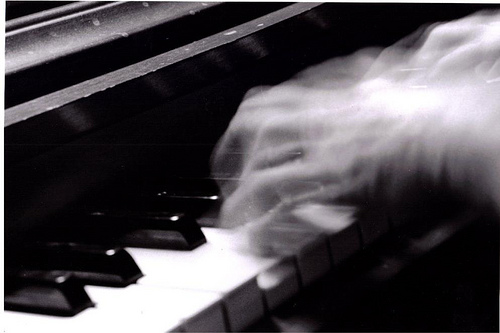
Blurred motion is done using slower shutter speeds, your goal is the blur some movement while not losing the vital information that the subject offers. The background in a blurred motion photograph should be focused. Only the motion should be blurred in blurred motion.
|
 stopped motion image by Christine P. stopped motion image by Christine P.
|
Blurred motion image by Flickr user "photography128240"
|
Panning is a technique in which you move the camera along the subject’s path. When looking at a photograph that demonstrated panning you will see a reasonably sharp subject and a background that is blurred is striations that are parallel to the direction that the camera was moved, generally horizontally. |
  
Out of focus blurred image
I argue, and grade accordingly, the belief that something in
the photograph should (must) be in focus. It's hard to look at without becoming nauseous. Yes, it is abstract. But great abstracts involve a level of focus as well.
|
 Panning image by Hanna L. Panning image by Hanna L.
|
Module Four Assignments:
-
Use Shutter Speed priority or Action Mode (Running Man, Children or Pets) on your camera to capture a stop motion photograph.
Upload it to FlickR with the Label "Stop Motion " and in the description explain how you know it is appropriate for the assignment and your Critique. (20 points)
- Use Shutter Speed priority or Auto (Normal) Mode on your camera to capture a blurred motion photograph. The background should still be focused - only what is moving should be blurry.
Upload it to FlickR with the Label "Blurred Motion " and in the description explain how you know it is appropriate for the assignment and your Critique. (20 points)
*Note* Some of you have a mode/scene that allows things to blur, for example "soft flowing water".
- Use the panning technique to capture motion in a photograph. Strive to "freeze the motion"; meaning your subject should be focused...a small amount of blur is alright; the background should be blurred in the direction you moved the camera. Try multiple camera settings as well as various subjects.
Upload it to FlickR with the Label "Panning" and in the description explain how you know it is appropriate for the assignment and your Critique. (20 points)
- Change the shooting options (mode or scene) on your camera to re-shoot one of your previous motion photos. For example, if you used a Motion Mode for stop motion, now try regular (auto) shooting mode while shooting the same image . Compare the settings and visual results; post your observations (thoughts) in the description field for the "Reshoot" image. Upload "Reshoot" to FlickR (4 points).
Extra Credit related to this Module will be to take a series of photos using a "Continuous Shooting" Mode or any setting that take a series of shots with one press of the shutter button. You will then put them together in Photoshop to make one image. The will simply be put next to each other in a panoramic like file format.
|

