Module One: Digital Cameras
|
Image Capture
Instead of film, a digital camera uses a device called a CCD (charge coupled device). The CCD is a light-sensitive chip that converts light into a digital (electrical) signal. The CCD is made up of thousands of individual sensors that are sensitive to green, red, or blue light. The sensors are also known as pixels (picture elements)
CCD Sensitivity
The CCD is designed to have options similar to using different film speeds (ISO settings). The higher the number or ISO setting, the greater the sensor's sensitivity to light. At an ISO of 800 or more, the camera's aperture only needs to be open for a short time in order to create an image, whereas using lower numbers means that the sensor needs more light to reach it in order to record a properly exposed shot.
|

http://micro.magnet.fsu.edu/primer/digitalimaging/concepts/images/ccdanatomyfigure2.jpg
Image Resolution
Resolution is explained as the number of horizontal pixels multiplied by the number of vertical pixels. The more pixels there are, the higher the resolution. In addition, the higher the resolution the more space (memory) your image requires. Higher resolution numbers also mean you will get a better quality (deatil and focus) print from a certain file.
Screen resolution is 72, for printing you will want to keep the resolution above 200.
|
|
File Formats
The Jpeg (Joint Photographic Experts Group) is the standard image file format for the Internet. Subsequently most digital cameras create this file format for each image taken. Jpegs are a compressed file format, which allows for easy viewing and storage. It’s best to set your camera to the largest image size and the smallest compression option, this will give you the highest quality image, however it will also means you can store fewer photos on your memory card. |
Metering
Correct exposure happens when your photograph has the same range and intensity of tone as the scene being photographed. Underexposure occurs when the sensor does not receive enough light, and overexposure occurs when the sensor receives too much light. Sensors on the camera measure the amount of light reflecting back off the subject(s), then the camera uses this information to calculate the exposure – a process known as metering.
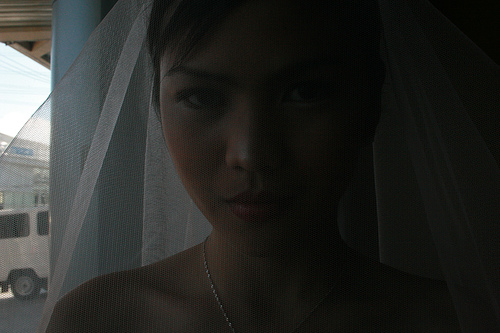
Underexposed photos will be dark because the camera did not have enough light or enough time to gather light, color and detail information.
|

Overexposed
In traditional film overexposure creates a DARK negative that then produces a light, washed out photo . Digital photography skips the film step... |
| |
All metering systems are calibrated to average the reflected to an 18% grey. Colors similar in density (value) to 18% grey are referred to as the mid-tones, these include green foliage, brown brickwork and concrete.
Two main types of metering systems are used in digital cameras, center-weighted average metering and multi zone metering. As the name would imply, center-weighted average meters take an average of the entire frame but gives most emphasis to the central area of the frame. The down fall of this system is that is it has difficulty exposing correctly for very bright or very dark scenes in addition to backlit subjects. When the frame is divided into a number of zones, as in the multi zone meters, an exposure reading is taken for each zone. It then uses the individual readings to calculate the overall exposure. It too has difficulty with backlit subjects. However, is more successful in coping with more situations than the center-weighted system.
|
Aperture and Shutter Speed
Proper exposure also depends on finding the right combination of aperture (the amount of light allowed into the camera) and shutter speed (how long the light is allowed to enter the camera). Aperture controls the amount of light much like the iris of a human eye, widening and constricting to let in more or less light depending on exposure needs. Apertures are shown in f/numbers. When viewed in sequence each f-stop lets in twice (or half) the amount of light.
|
|
|
Aperture choice will also change the amount of the final photograph that appears to be in focus. This is referred to as Depth of Field.
Shutter Speed is measured in fractions of a second. For example 250 is 1/250th of a second, 2 is ½ (half) a second and 1 is a full second. Again each step is called a stop, and represents the doubling or halving of the amount of light entering the camera. Shutter Speed can be manually controlled to alter how motion (a moving subject) is captured in your photographs.
|

|
TRANSFERING AND STORING FILES
Memory cards initially store your images. Using either a USB cord or a Memory Card Reader you can transfer your images to a computer. Our Macs will assume that you want to store your images in iPhoto. You can override this by closing iPhoto and navigating to an alternative storage location (i.e. your network folder or a Flash drive) then click and drag the files you wish to transfer. Be sure that you copy instead of move the files if you want them to remain on your camera! If you store your images only in iPhoto other people can view and alter your images. |
Online Photo Sharing: We will be setting up a Flickr account.
|
Module One Assignments:
- Demonstrate the ability to change the ISO, Aperture and Shutter Speed on your camera. ("Check off assignment" 4 points)
- Set up a yahoo or ymail account. First try using firstnamelastinitial@ymail.com e.g. (janed@ymail.com). If that doesn't work choose one of the given options. Be sure to tell instructor the e-mail you are using for FlickR. I record e-mail addresses and usernames (passwords only if requested).
- Set up your Flickr account using the e-mail account you just created. (4 points)
- Take an image of yourself using Photobooth (save this image somewhere we will use it again later in the semester)
- Upload the image of yourself to your Photostream. (4 points)
- Transfer an image from your camera to either your network folder or a Flash drive. ("Check off assignment" 4 points)
|
Another article summarizing the information here. |


